AutoGPT Review 2026 – Features, Pricing, Pros & Cons
AutoGPT Overview
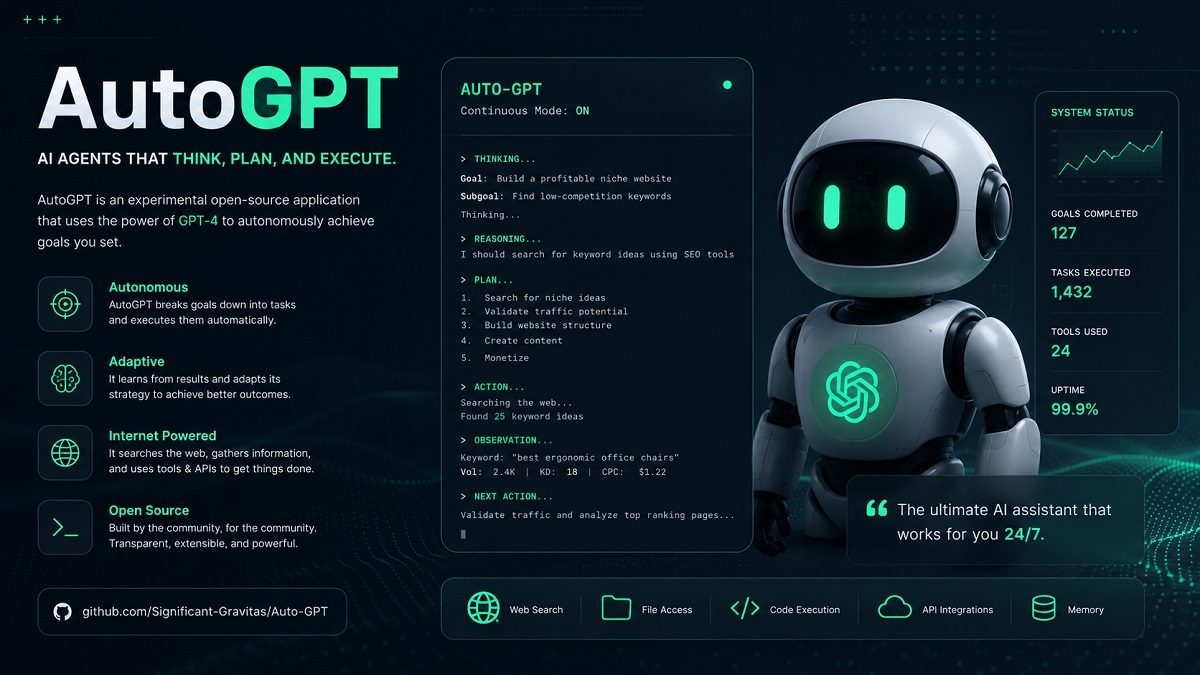
AutoGPT is an experimental open-source AI tool that extends the capabilities of large language models by enabling them to act autonomously. Instead of requiring step-by-step human prompts, AutoGPT can break down complex goals into smaller tasks, execute them sequentially, and refine its actions based on results. It leverages APIs, memory systems, and external tools to simulate a more “agent-like” behavior, making it useful for tasks such as research, content generation, coding, and automation workflows.
What sets AutoGPT apart is its ability to operate with minimal human intervention, essentially turning AI into a self-directed problem solver. While powerful, it still requires careful setup and monitoring, as outputs can vary and resource usage can be high. Overall, AutoGPT represents a significant step toward autonomous AI agents, offering a glimpse into how future systems may independently plan, execute, and optimize tasks across different domains.
AutoGPT: Quick Verdict
AutoGPT is a powerful and forward-looking AI tool that brings true automation closer to reality by allowing AI to plan and execute tasks independently. It’s ideal for developers, tech enthusiasts, and advanced users who want to experiment with autonomous workflows, research automation, or complex task chaining.
However, it’s not yet a plug-and-play solution for beginners. It can be resource-intensive, occasionally unpredictable, and requires technical setup and oversight. If you’re comfortable with AI tools and want cutting-edge automation, AutoGPT is impressive—but for casual users, simpler AI tools may be more practical for now.
Pros of AutoGPT
- Autonomous task execution: AutoGPT can break down complex goals into smaller steps and execute them independently without constant human input, making it highly efficient for multi-step workflows.
- Saves time and boosts productivity: It automates repetitive and time-consuming tasks like research, reporting, and content generation, completing them much faster than manual processes.
- Handles complex workflows: Unlike traditional AI chatbots, AutoGPT can manage entire projects by chaining tasks together and refining results as it progresses.
- Real-time data access: With internet connectivity and plugins, AutoGPT can fetch and use up-to-date information, improving accuracy for research and analysis tasks.
- Memory capabilities: It supports short-term and long-term memory (via vector databases), allowing it to retain context, learn from previous tasks, and improve over time.
- Scalable operations: Multiple AI agents can run in parallel, enabling businesses to scale tasks like market research, content creation, and data analysis efficiently.
- Open-source and customizable: Being open-source, developers can modify, extend, and integrate AutoGPT into custom workflows or applications.
- Reduces manual effort and costs: Automation of knowledge work can lower operational costs and free up human resources for higher-value tasks.
Cons of AutoGPT
- High resource usage: AutoGPT can consume significant API credits and computing resources, especially when running long or complex task chains.
- Unpredictable outputs: Since it operates autonomously, results can sometimes be inaccurate, irrelevant, or inconsistent without proper monitoring.
- Requires technical setup: Installation, configuration, and API integration can be challenging for beginners or non-technical users.
- Limited reliability: It may get stuck in loops, repeat actions, or fail to complete tasks efficiently without human intervention.
- Dependency on external tools: Performance often relies on APIs, plugins, and internet access, which can introduce failures or delays.
- Security and privacy concerns: Granting access to files, systems, or external services can pose risks if not properly controlled.
- Slower for simple tasks: For basic queries or quick outputs, AutoGPT can be overkill compared to simpler AI tools.
- Still experimental: The technology is evolving, and stability, usability, and real-world efficiency are not yet fully optimized.
What is AutoGPT?
AutoGPT is an open-source AI application that builds on top of large language models like GPT to create autonomous AI agents. Unlike traditional chat-based AI that requires continuous user input, AutoGPT can take a single goal and independently plan, execute, and refine a sequence of tasks to achieve it. It uses tools such as internet browsing, file handling, and memory storage to simulate decision-making and complete complex workflows.
In simple terms, AutoGPT turns AI from a reactive assistant into a proactive system that can think through problems step by step. While it’s powerful for automation, research, and development tasks, it is still experimental and often requires human oversight to ensure accuracy, efficiency, and cost control.
AutoGPT Workflow
Our AutoGPT workflow follows a structured, goal-driven approach to automate complex tasks efficiently. Each step is designed to ensure accuracy, adaptability, and minimal human intervention.
1. Define the Goal
The process begins by clearly defining the objective. This could be content creation, data scraping, research, or automation of repetitive tasks.
2. Initialize Agent
AutoGPT initializes an AI agent with memory, tools, and constraints. This allows it to operate independently while staying aligned with the defined goal.
3. Task Planning
The agent breaks down the main objective into smaller actionable tasks and prioritizes them for efficient execution.
4. Execute Actions
AutoGPT performs tasks such as browsing, writing, coding, or API calls. It continuously evaluates outputs before moving to the next step.
5. Memory & Feedback Loop
Results are stored in memory, enabling the agent to learn from previous steps and refine future actions through iterative feedback.
6. Final Output
Once all tasks are completed, AutoGPT compiles the results into a structured and usable output aligned with the original goal.
Key Features of AutoGPT
AutoGPT is designed to automate complex workflows with minimal human input. Below are its most important features that make it a powerful AI automation tool.
- Autonomous Task Execution: Operates independently by breaking down goals into actionable steps without constant user input.
- Goal-Oriented Planning: Converts high-level objectives into structured workflows for efficient execution.
- Memory Management: Uses short-term and long-term memory to retain context and improve decision-making over time.
- Internet Access: Can browse the web, gather real-time data, and use online resources to complete tasks.
- File Handling: Reads, writes, and manages files for tasks like report generation, coding, and data storage.
- Tool Integration: Supports APIs and external tools, enabling automation beyond simple text generation.
- Self-Improvement Loop: Evaluates its own outputs and refines actions through continuous feedback.
- Multi-Step Reasoning: Handles complex problems by dividing them into smaller, logical steps.
- Code Generation & Execution: Writes and executes code for automation, analysis, and development tasks.
- Customizable Agents: Allows users to define roles, constraints, and behaviors for tailored workflows.
AutoGPT: Performance and Ease of Use
AutoGPT delivers strong performance when handling complex, multi-step tasks. Its ability to autonomously plan and execute actions makes it highly efficient for workflows like research, content generation, and automation.
Performance
In terms of performance, AutoGPT excels at breaking down large goals into manageable steps and executing them systematically. It can process data, generate content, and interact with external tools with minimal supervision. However, performance may vary depending on task complexity, API limits, and system configuration.
For long-running tasks, AutoGPT’s iterative feedback loop helps improve accuracy over time, though it may occasionally require human intervention to refine outputs or correct direction.
Ease of Use
AutoGPT is powerful but comes with a moderate learning curve. Initial setup, including API configuration and environment setup, may be challenging for beginners. However, once configured, it becomes significantly easier to use for automating repetitive or complex workflows.
Users with technical knowledge will benefit the most, while beginners may need some time to fully understand its capabilities and limitations. Despite this, its automation potential makes it a valuable tool for productivity and efficiency.
Key Specifications of AutoGPT
AutoGPT is a powerful autonomous AI agent built to perform complex tasks with minimal human input. Below are its core technical and functional specifications.
- Type: Autonomous AI Agent
- Core Technology: Powered by GPT-based large language models
- Operation Mode: Goal-driven and self-directed execution
- Memory System: Short-term and long-term memory support
- Internet Access: Optional web browsing for real-time data retrieval
- File Handling: Supports reading, writing, and managing local files
- Programming Capability: Code generation and execution support
- Tool Integration: API support and external tool connectivity
- Platform Support: Runs on Windows, macOS, and Linux environments
- Setup Requirement: Requires API key and local environment configuration
- Automation Level: High (minimal user intervention required)
- Use Cases: Research, content creation, automation, data analysis
AutoGPT Pricing
AutoGPT itself is an open-source tool, which means it is free to use. However, the overall cost depends on the APIs and resources you use while running it.
Open Source Access Free
AutoGPT can be downloaded and used at no cost. You can run it locally on your system without paying for the software itself.
API Usage Costs Pay-as-you-go
To function, AutoGPT relies on AI models accessed via APIs. These APIs are typically billed based on usage (such as tokens or requests). The more complex or longer your tasks, the higher the cost may be.
- Charges depend on the model used and request volume
- Higher usage = higher cost
- Efficient prompts can reduce expenses
Infrastructure Costs Variable
Running AutoGPT may require local computing resources or cloud services. Costs can include server usage, storage, and electricity if running continuously.
- Local machine (minimal cost)
- Cloud hosting (monthly or hourly charges)
- Additional tools or integrations (optional costs)
Total Cost Overview
While AutoGPT is free to install, real-world usage typically involves variable costs depending on API usage and infrastructure. For light use, costs remain low, but heavy automation workflows can increase expenses.
Who Should Use AutoGPT?
AutoGPT is best suited for users who want to automate repetitive workflows, research tasks, and AI-powered operations with minimal manual input. It works especially well for developers, entrepreneurs, and productivity-focused teams looking to experiment with autonomous AI agents.
- Developers & Engineers — Ideal for building AI-driven automation systems, coding assistants, workflow agents, and research bots.
- Startup Founders — Useful for automating market research, idea validation, competitor tracking, and operational tasks.
- Content Creators & Marketers — Helps generate outlines, SEO research, social media ideas, and repetitive content workflows.
- Researchers & Analysts — Great for collecting, summarizing, and organizing information from multiple sources.
- AI Enthusiasts — A strong option for users who want to explore autonomous AI agents and advanced GPT-based automation tools.
- Productivity-Focused Teams — Can reduce manual work by automating recurring digital tasks and workflows.
AutoGPT may not be ideal for complete beginners because setup, configuration, and API management can require some technical knowledge. Users looking for a simpler no-code AI assistant may prefer more beginner- friendly alternatives.
Alternatives to AutoGPT
While AutoGPT helped popularize autonomous AI agents, several newer tools and frameworks now offer better flexibility, multi-agent collaboration, easier deployment, or more developer control. The best alternative depends on your workflow, coding experience, and automation goals.
| Tool | Best For | Key Strength | Difficulty |
|---|---|---|---|
| LangChain | Custom AI workflows | Massive ecosystem & integrations | Advanced |
| CrewAI | Multi-agent collaboration | Role-based AI teams | Moderate |
| LangGraph | Stateful AI systems | Visual workflow orchestration | Advanced |
| AgentGPT | No-code AI agents | Browser-based simplicity | Beginner |
| BabyAGI | Experimental AI task loops | Lightweight autonomous agents | Moderate |
| Microsoft AutoGen | Conversational AI agents | Agent-to-agent communication | Advanced |
| Semantic Kernel | Enterprise AI automation | Strong Microsoft ecosystem support | Moderate |
| Flowise | Visual AI workflow building | Drag-and-drop interface | Beginner |
For developers needing maximum flexibility, LangChain and LangGraph are among the most powerful choices. Teams focused on collaborative AI workflows often prefer CrewAI, while beginners may find AgentGPT or Flowise easier to start with.
AutoGPT vs Alternatives: Comparison
AutoGPT was one of the first autonomous AI agent projects to gain mainstream attention, but newer frameworks now offer improved workflow control, multi-agent collaboration, visual builders, and easier deployment. The right platform depends on whether you prioritize automation, coding flexibility, simplicity, or enterprise-scale orchestration.
| Platform | Best Use Case | Ease of Use | Main Strength | Ideal For |
|---|---|---|---|---|
| AutoGPT | Autonomous task execution | Moderate | Self-directed AI workflows | Developers & AI enthusiasts |
| CrewAI | Multi-agent collaboration | Moderate | Role-based AI teamwork | Teams & workflow automation |
| LangChain | Custom LLM applications | Advanced | Extensive integrations | Developers & enterprises |
| LangGraph | Stateful AI orchestration | Advanced | Complex workflow management | Advanced AI systems |
| AgentGPT | No-code AI agents | Easy | Browser-based simplicity | Beginners & casual users |
| BabyAGI | Experimental AI agents | Moderate | Lightweight task planning | Researchers & hobbyists |
| Microsoft AutoGen | Conversational AI systems | Advanced | Agent-to-agent communication | Enterprise developers |
| Flowise | Visual AI workflow builder | Easy | Drag-and-drop interface | No-code users |
Compared to modern alternatives, AutoGPT still remains a strong open-source option for autonomous AI experimentation, but tools like CrewAI and LangGraph provide more structured orchestration and scalability for production workflows. Meanwhile, Flowise and AgentGPT offer easier onboarding for non-technical users.
Final Verdict on AutoGPT
AutoGPT remains one of the most influential autonomous AI agent frameworks ever released, helping define the modern AI agent movement. Even in 2026, it continues to attract developers, researchers, and AI enthusiasts who want flexible open-source automation and autonomous workflow experimentation.
Its biggest strengths are flexibility, open-source transparency, autonomous task execution, and a large developer community. The newer low-code tools and visual agent builders also make AutoGPT more accessible than the early experimental versions released in 2023.
However, AutoGPT still requires supervision for complex or business-critical tasks. Long autonomous runs can become unreliable, API costs may increase quickly, and advanced setups often require technical experience. Many users now prefer more structured alternatives like CrewAI, LangGraph, or AutoGen for production-grade workflows.
Bottom line: AutoGPT is still an excellent platform for experimenting with autonomous AI agents, workflow automation, and advanced GPT-based systems. It is best suited for developers, startups, researchers, and power users who want customization and open-source flexibility. Casual users or teams needing stable enterprise automation may find newer AI agent platforms easier to manage and scale.
Try AutoGPT Now